S32N5 Software Development Kit (SDK)

動画の上をクリックすると再生されます。

ソフトウェア詳細

図を選択する。:

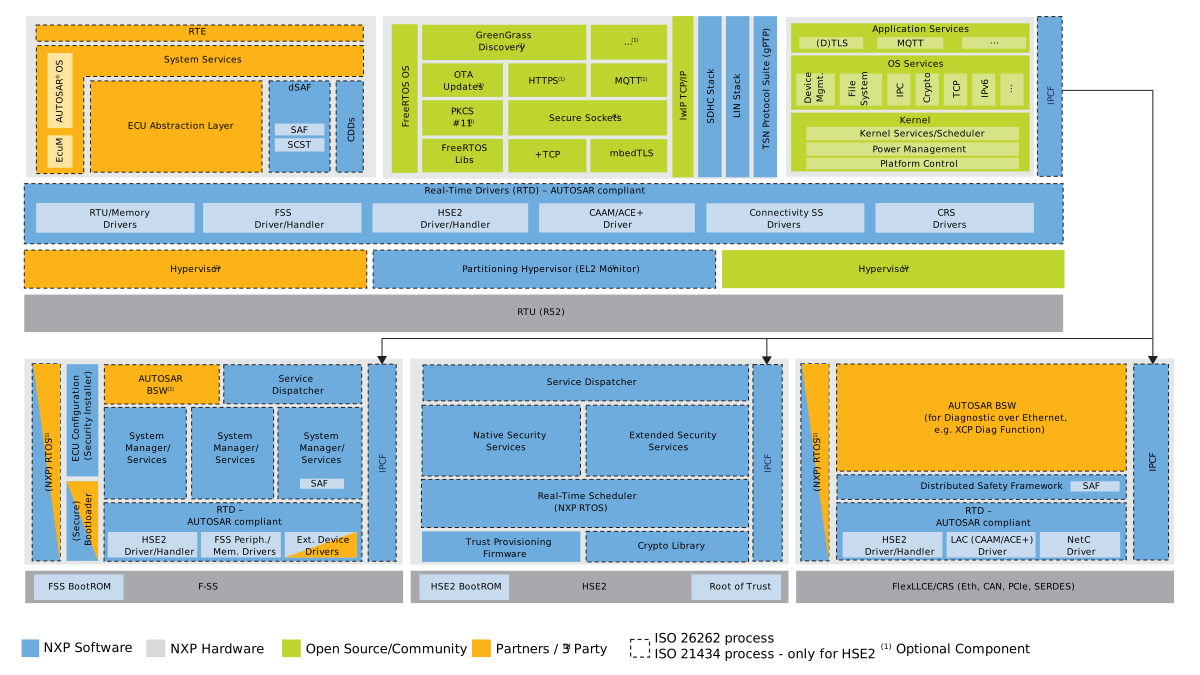
S32N5 SDK Architecture

S32N5 SDK Architecture Overview

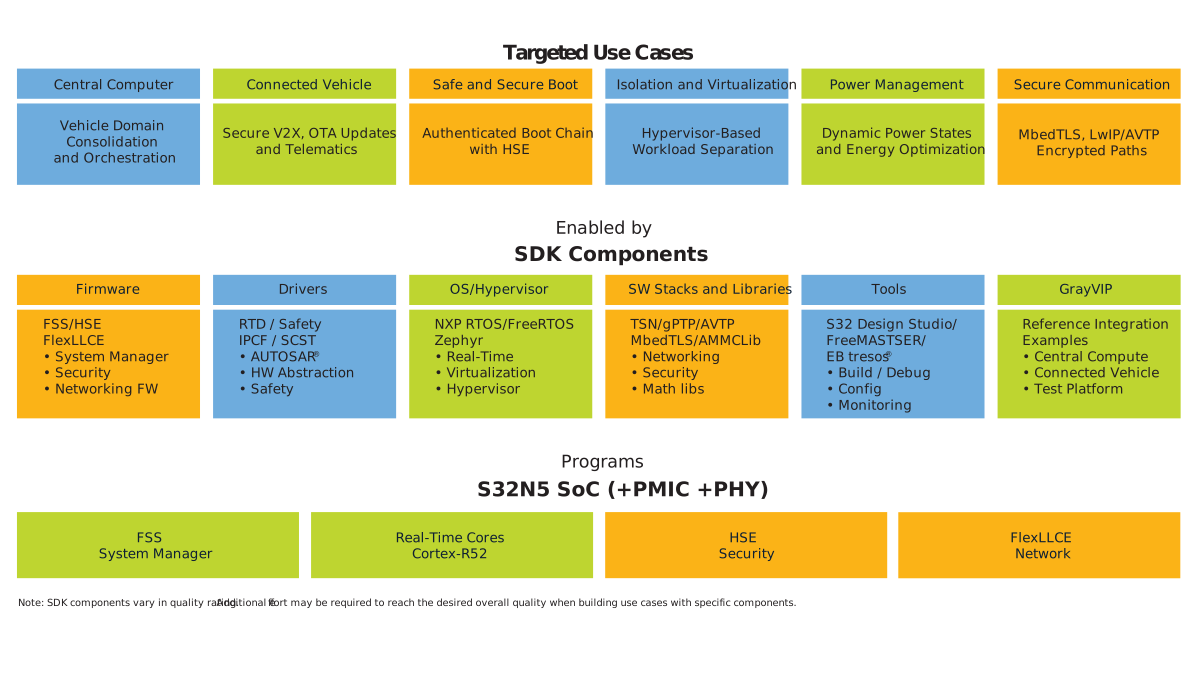
S32N5 SDK Ecosystem

S32N5 SDK Ecosystem

Features

Boot and Isolation

  • Cohort secure boot: FSS firmware and Communication Real-time Subsystem (CRS) application cohort booted securely by Hardware Security Engine (HSE), with image integrity verified via the Secure Memory Region (SMR) mechanism
  • Inter and intracohort isolation: Supports multiple isolated cohorts (and subdivided domains) on a single system on chip (SoC), providing freedom from interference
  • Boot to Safety: The CRS cohort executes a boot-to-safety startup flow to establish the safety context
  • FSS runtime boot service: The FSS boot manager controls the intercohort boot flow and reports cohort status

Security, Cryptography and Interprocessor Communication

  • Distributed AES Accelerator (ACE+): Supports concurrent Advanced Encryption Standard (AES) operations from CRS and RTU0 cohorts
  • Cryptographic services: Provides AES-128-ECB encryption and decryption, Cipher-based Message Authentication Code (CMAC) generation and verification, and key isolation through the HSE interface
  • Distributed Cryptographic Acceleration and Assurance Module (CAAM): Provides CAAM access to the from the CRS and RTU0 cohorts
  • Intercohort and intracohort communication: Supports client-server communication between CRS and RTU cohorts and between cores within a cohort
  • Remote command - Commands sent to the CRS through a universal asynchronous receiver-transmitter (UART) interface are forwarded to different cores through the Inter-Platform Communication Framework (IPCF)

Automotive Networking

  • CAN communication and FlexLLCE accelerator: Supports internal and external Controller Area Network (CAN) communication and autonomous CAN offload and gateway engine capabilities
  • Inter-Cohort communication via Ethernet: Uses the Network Ethernet Controller (NETC) switch for internal and external (SGMII/RGMII) loopback
  • External communication via Ethernet (TCP/IP): RTU3 to external device, demonstrating the TCP/IP stack
  • SGMII and RGMII Support: Both physical layers are supported. Reduced Gigabit Media Independent Interface (RGMII) is used by default and can be switched to Serial Gigabit Media Independent Interface (SGMII)
  • generalized Precision Time Protocol (gPTP) synchronization and Time-Sensitive Networking (TSN) stack: Supports gPTP synchronization and TSN features, including frame preemption, time-aware shaping and frame replication and elimination
  • Peripheral Component Interconnect Express (PCIe) configuration: Configures an external device with status reporting

Functional Safety and Diagnostics

  • Distributed safety: Supports hardware fault injection and detection, FSS error handling and cohort recovery
  • Structural Core Self-Test (SCST): Provides a self-test library for Arm Cortex-R52 cores to increase diagnostic coverage

System Resource Management

  • Cohort memory handling: Provides a shared xSPI interface between cohorts, with each cohort using its own Host Interface (HIF)
  • Core load measurement: Measures the per-core computational load assessment
  • Cohort peripheral and I/O handling: Provides per-cohort, fully isolated control of general-purpose input/output (GPIO), watchdogs, timers and UARTs.
  • Mode manager: Manages and shares state information across all cohorts
  • Sensor temperature measurement: Reports per-resource temperature readings (FSS, RTU0-RTU3, SMMS0) reported to the console at runtime

Monitoring, Logging and Connectivity

  • Log and command interface: Provides UART-based logging and command handling across cohorts through IPCF
  • Event logger: Automatic event-based data logging
  • Cloud telemetry: Gathers telemetry from each cohort and sends it to the cloud
  • FreeMASTER: Provides real-time monitoring, visualization and graphical control panel
  • HTTP server: Provides a basic web server offering control over the log system

対応製品

  • S32N5: S32N5車載超統合プロセッサ

ダウンロード

クイック・リファレンス ソフトウェア・タイプ.

1 ダウンロード

  • デバッグと可視化ツール

    Automotive Software Package Manager注目新規

注: より快適にご利用いただくために、ソフトウェアのダウンロードはデスクトップで行うことを推奨します。
ドキュメント

クイック・リファレンス ドキュメンテーションの種類

1 ドキュメント

コンパクトリスト

設計・リソース

ハードウェア

クイック・リファレンス ボードタイプ.

1 ハードウェア提供

サポート

お困りのことは何ですか??