開発当初からシステムを明確に決定しておけば、後の段階でエンジニアが非効率な再作業を迫られる必要性がなくなります。ほとんどのプロジェクトは、回路図やコードの作成を開始する前に、複数のコンポーネントがどのように相互作用するのか、設計アプローチを拡張するかどうかなどを決めるところから始まります。NXPのBlock Diagram Designerは、設計に着手した時点からアプリケーション全体を視覚化できるため、アイデアを短時間で形にして検証済みのシステム・コンセプトを作成することができます。最初からシステム・レベルで作業を進められるため、自信を持ってアーキテクチャを決定し、チームの足並みを揃え、不確実性を減らしてから、詳細な設計に取りかかることができます。
最初にシステムを明確化する
すべてのプロジェクトは、アプリケーションの要件と設計の制約条件を特定することから始まります。設計するものがスマート・サーモスタットでも、産業用ゲートウェイでも、エッジIoTデバイスでも、完成したシステムの中でプロセッシング、消費電力、コネクティビティ、周辺機器をどのように組み合わせるのかを最初に把握しておく必要があります。
システム・プランニングを1つのワークスペースに集約するBlock Diagram Designerが、この初期段階をサポートします。データ・シート、ツール、ドキュメントを切り替えながら作業するのではなく、1つのビジュアル・キャンバスでデザイン・センターのリソースを活用しながら作業を進めることができます。このアプローチによって選択肢を迅速に評価できるため、プロセスの早い段階で的確な情報に基づいて決定を下すことができます。
実際のアプリケーションを中心としたデザイン
Block Diagram Designerは、エンジニアリング・チームが個々のコンポーネントではなくアプリケーションに集中できるようにすることを目的に開発されました。たとえば、デザイン・センターで公開されているアプリケーション・テンプレートはインダストリアル、オートモーティブ、IoT向けの一般的なユースケースに合わせて構築されており、これを基にして設計を開始することができます。
こうしたテンプレートは実績のあるアーキテクチャを基にしており、高い実用性を持ちながらも応用力にも優れた、開発の出発点となります。システム全体のコンテキストを把握しつつ、要件の調整、コンポーネントの入れ替え、機能ブロックの調整を進めることができます。こうした柔軟性により、複数のエンジニアリング・チーム間で設計意図を明確にやり取りしながら、繰り返しの作業を効率化することができます。
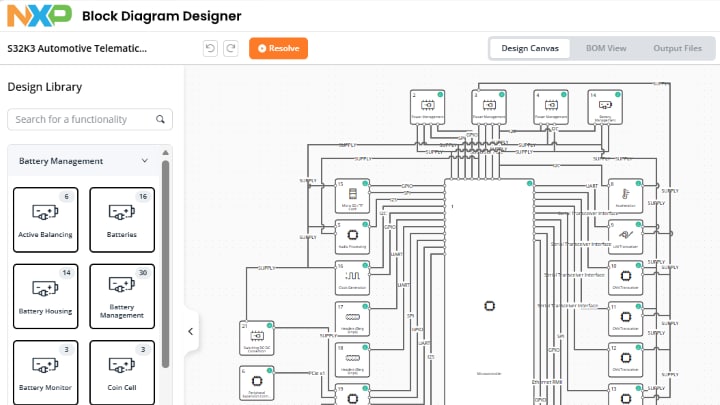 NXP Block Diagram Designerを使用してシステム・レベルで視覚化されたオートモーティブ・アプリケーションの例。
互換性のあるコンポーネントの確実な選択
特にプロジェクトの初期段階では、コンポーネントの選択によってリスクが生じることがよくあります。Block Diagram Designerでは、実際の技術データと設計ルールに基づいて各ブロックを選択できるため、そうしたリスクが軽減されます。
NXPの技術ドキュメント・ライブラリで提供されているデータ・シート、ピン構成、CADモデルなどのリソースから情報を取得し、多くの情報に基づく設計決定をサポートします。組み込みの互換性ガイダンス機能によって、コンポーネントの最適な組み合わせが示されるため、ミスマッチを回避し、再作業を最小限に抑えながら設計業務を進めることができます。
効率的に実装へと移行
システム・コンセプトが確定したら、具体的な開発へと進むことができます。Block Diagram Designerは業界標準の電子設計自動化 (EDA) ワークフローへのエクスポート機能を備えているため、最初からやり直さなくても、アーキテクチャからハードウェア設計へとスムーズに移行できます。
このフローでは、NXPの幅広い開発ソフトウェアとツールを利用できます。システムの計画から実装までの間で継続性が維持されるため、プロジェクトのライフサイクル全体を通じて一貫した設計意図を保ちながら、非効率な重複作業を減らすことができます。
ハードウェア設計とソフトウェア・イネーブルメントの接続
ハードウェアとソフトウェアの一体化によって、システムはより強固に統合されます。Block Diagram Designerはnxp.comのイネーブルメント・エコシステムと直接連携するため、アーキテクチャの検討からアプリケーションの開発へとシームレスに移行することができます。
表示されるシステム・ビューから、選択したコンポーネントをサポートするソフトウェア・サンプル、リファレンス・デザイン、ドキュメントにアクセスできます。アプリケーション・コード・ハブ (ACH) と統合されているため、開発するシステム・アーキテクチャとアプリケーションに合わせて設計されたコード・サンプルを活用でき、開発を迅速化できます。