FRDM-A-S32M276開発ボードのセットアップおよびプログラミングのスタート・ガイド
このドキュメントの内容
-
パッケージの内容
-
ソフトウェアの入手
-
接続
-
ビルドと実行
サインイン 進行状況を保存するには アカウントをお持ちでない方 アカウントを作成する。
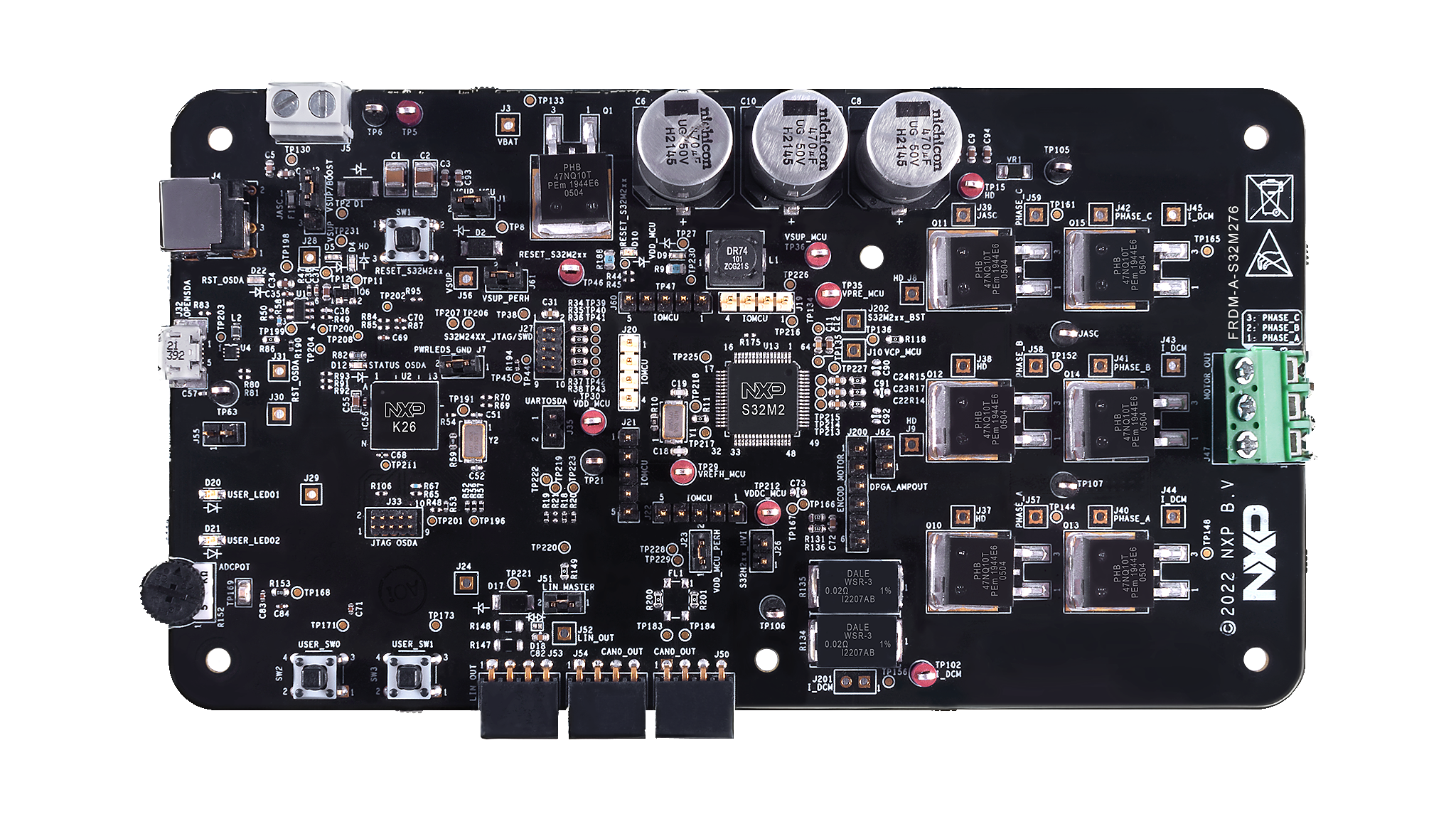
お客様の 車載向けFRDM S32M276開発ボード
1. パッケージの内容
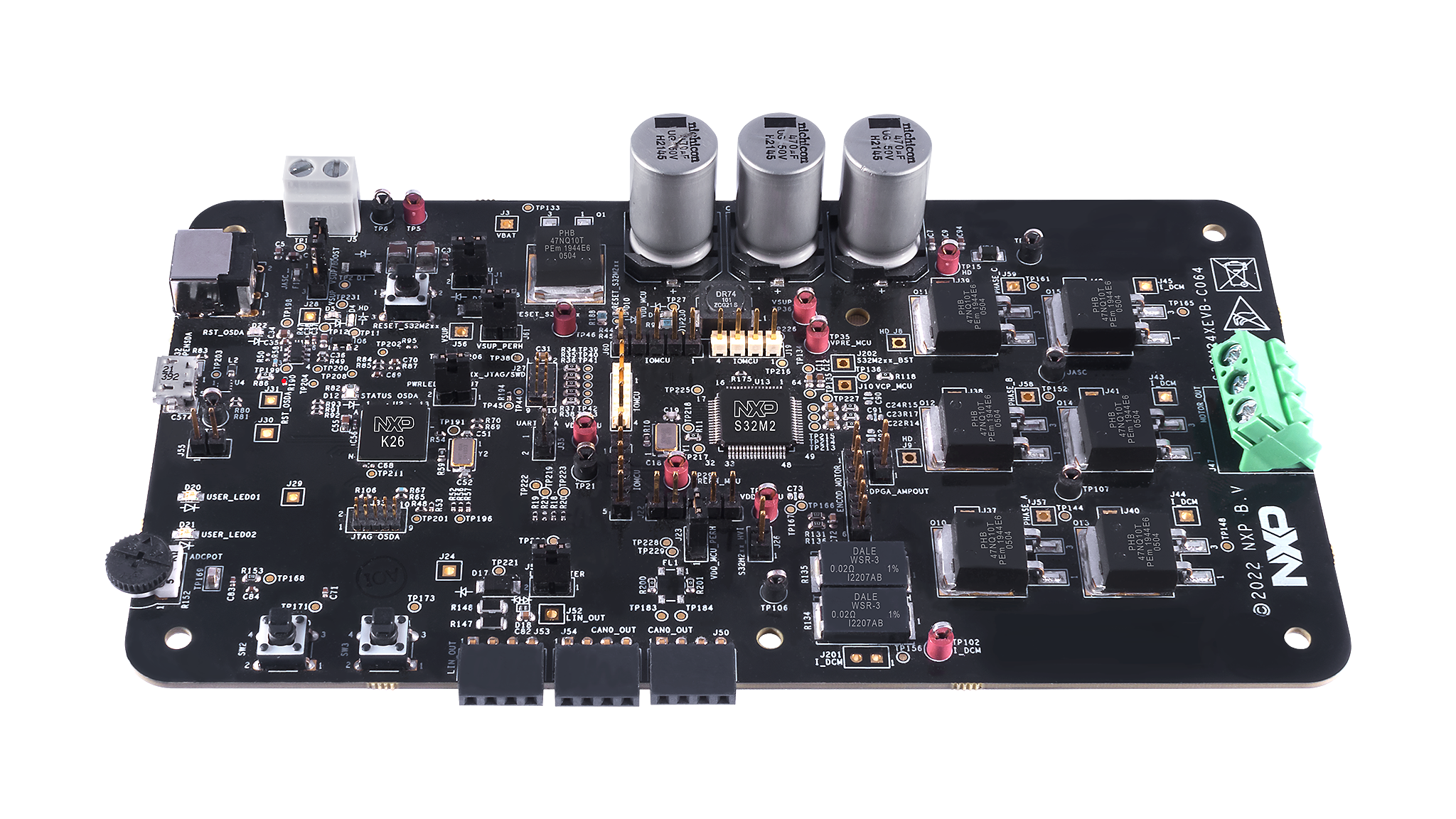
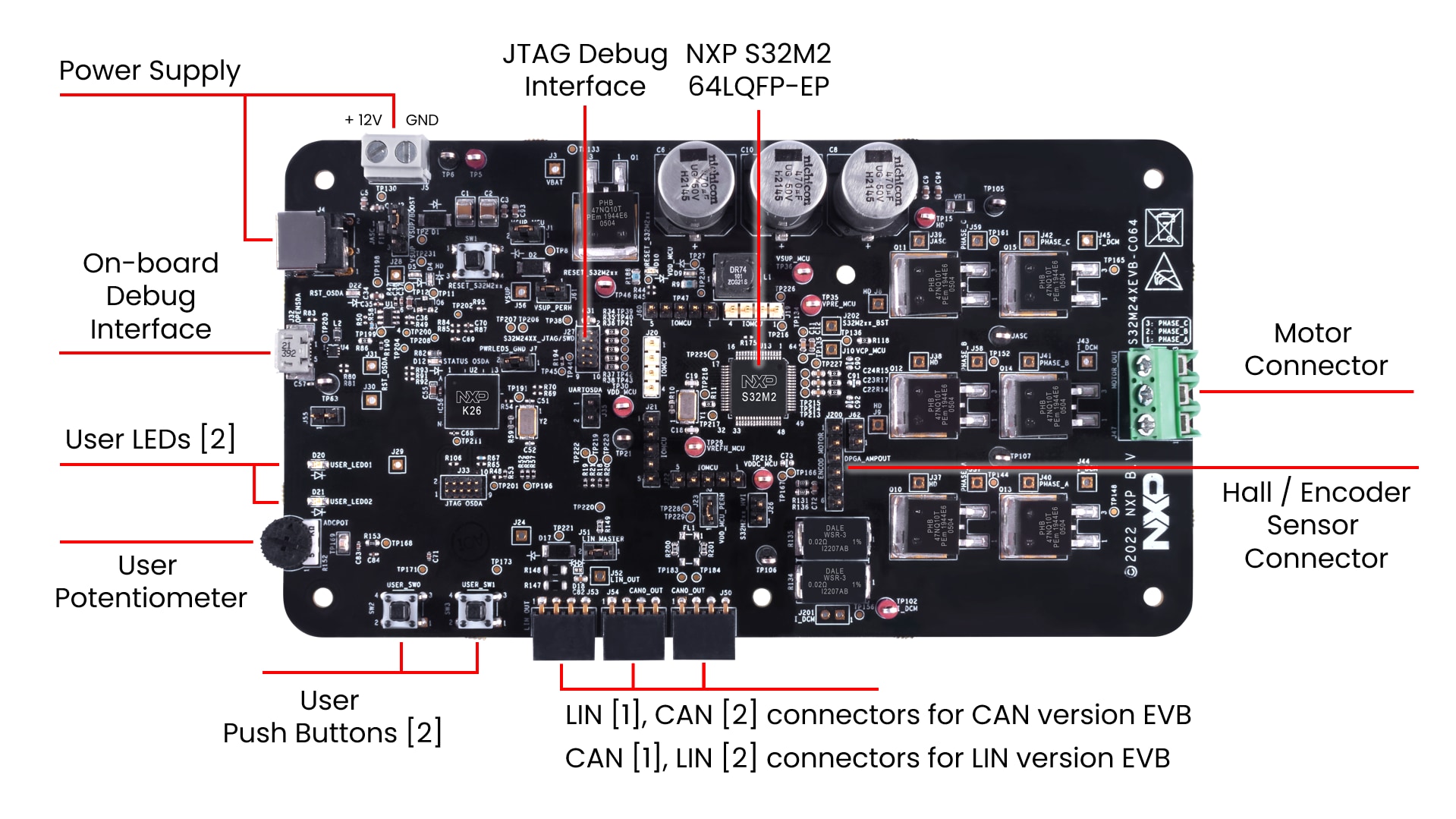
2. ソフトウェアの入手
資格情報を使用してNXPにサインインします。
2.1 ソフトウェアのインストール
- FRDM Automotive Bundleのリンクからソフトウェア・バンドルへ移動します
- [Generate(生成)]をクリックしてダウンロードします
-
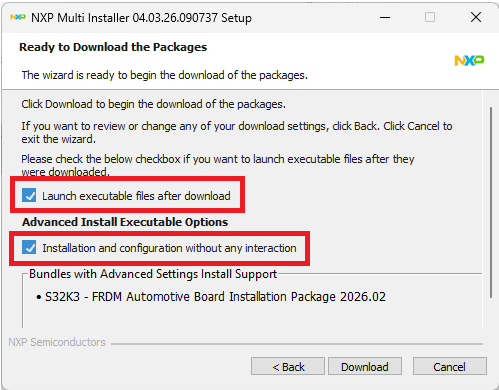
NXP Multi Installerを実行します
「Launch executable after download(ダウンロード後に実行可能ファイルを起動する)」と「Installation and configuration without any interaction(操作を一切行わずにインストールおよび構成する」を選択すると、FRDMバンドルと利用可能なすべてのコンポーネントが一緒にインストールされます。すべてのソフトウェアが自動でインストールおよび構成されました。
- デスクトップに作成されたショートカットからS32 Design Studio for S32 Platform 3.6.5を起動します
3. 接続
FRDM-A-S32M276開発ボードに推奨されるアクセサリ・キットはBLDC_KIT(ソフトウェア開発済みおよび特定のモータ向けに調整済み)ですが、代わりに任意の適切な三相モーターと12 V電源を使用することもできます。
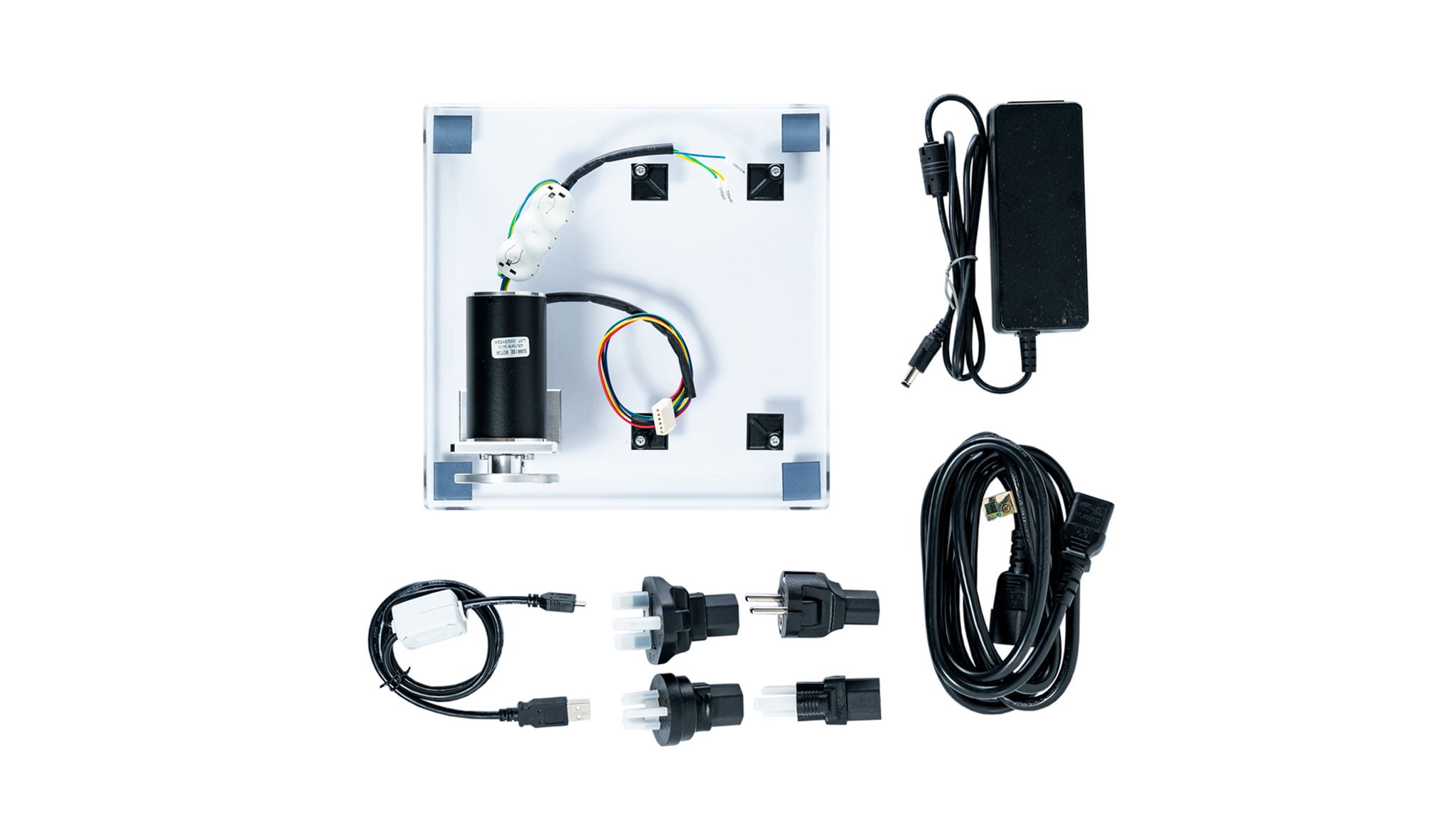
BLDC_KITの内容:
- ホール・センサSunrise 42BLY3A78-24110を搭載した95 W BLDCモーター
- アクリル樹脂板
- 12 V、5 A電源Meanwell GST60A12-P1J
- ユニバーサル・プラグ一式を備えた電源ケーブル
- EVB用の4個の自己接着スタンドオフTakachi AST3-10B
- Micro-USBケーブル
3.1 FRDM-A-S32M276評価ボードのジャンパのデフォルト位置の確認
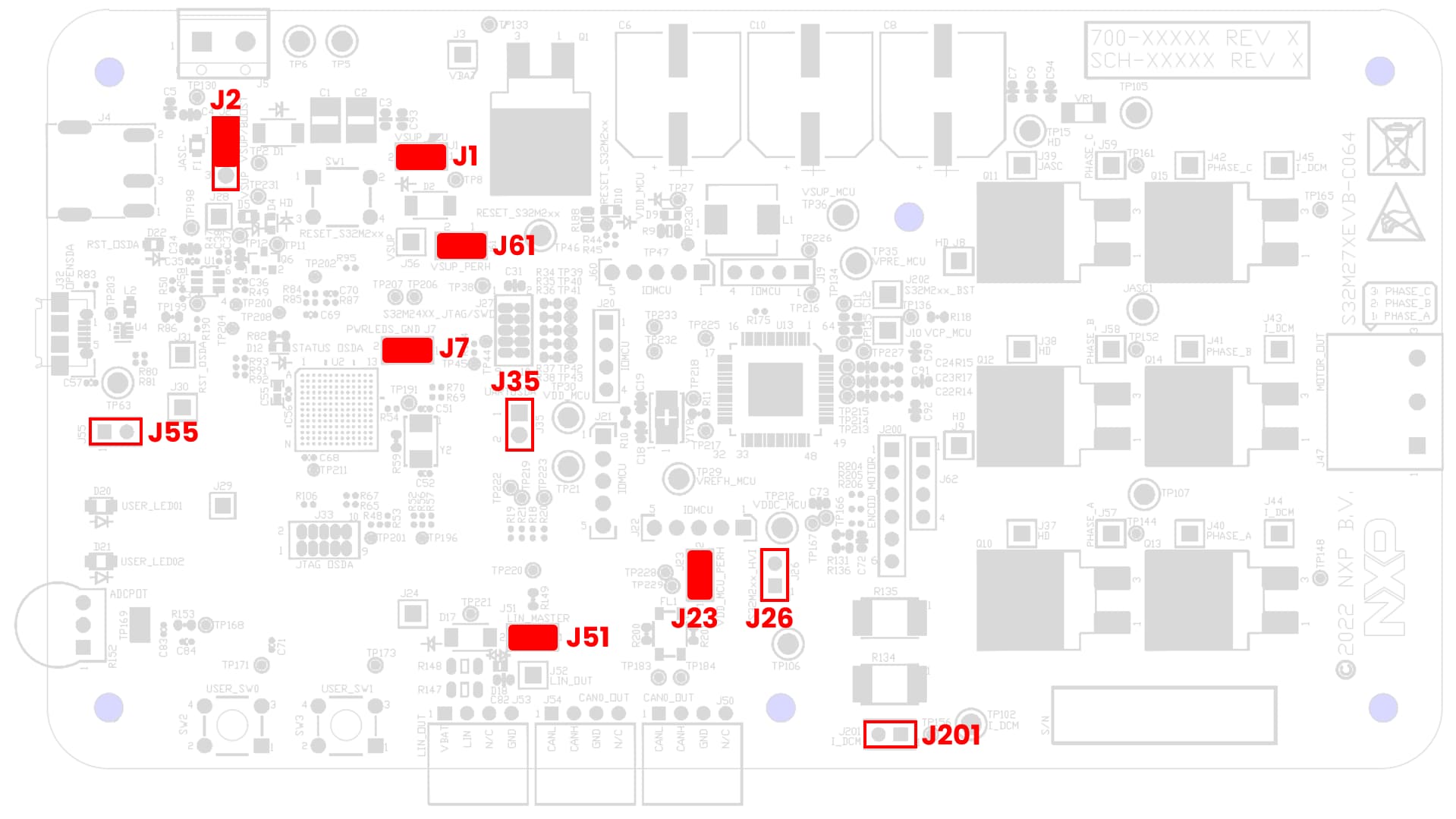
| FRDM-A-S32M276でのデフォルトのジャンパ設定 | ||
|---|---|---|
| ジャンパ | 状態 | 備考 |
J1 |
閉 | VSUP_MCUはMCUのVSUP入力にルーティングされます |
J2 |
1-2 | VBATはVSUPにルーティングされます。昇圧コンバータ切断 |
J7 |
閉 | 電源ドメインのLEDインジケータが有効になります |
J23 |
閉 | VDD_MCUはVDD_MCU_PERHに接続されます |
J26 |
開 | [1] 高電圧入力、[2] グランド |
J35 |
開 | [1] LPUART0_RX、[2] LPUART0_TX |
J51 |
閉 | LIN Commander*モード |
J55 |
開 | ADCポテンショメータ無効 |
J61 |
閉 | VSUPはVSUP_PERHにルーティングされます |
J201 |
開 | 電流シャント電圧、未実装 |
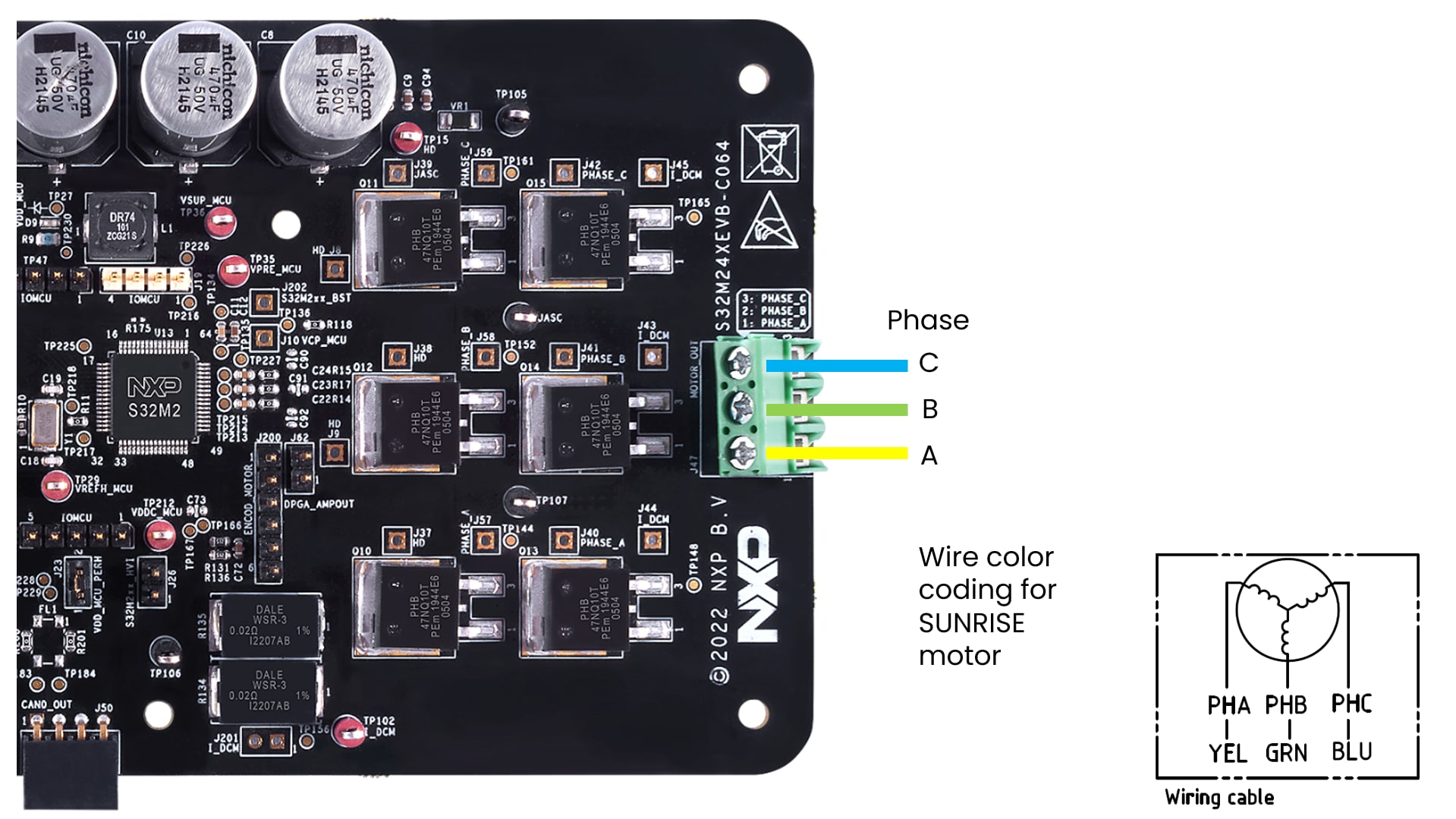
3.3 エンコーダ/ホール・センサの接続
必要に応じてエンコーダ/ホール・センサを接続します(センサ・ベースのソフトウェア・アプリケーションの場合のみ)。
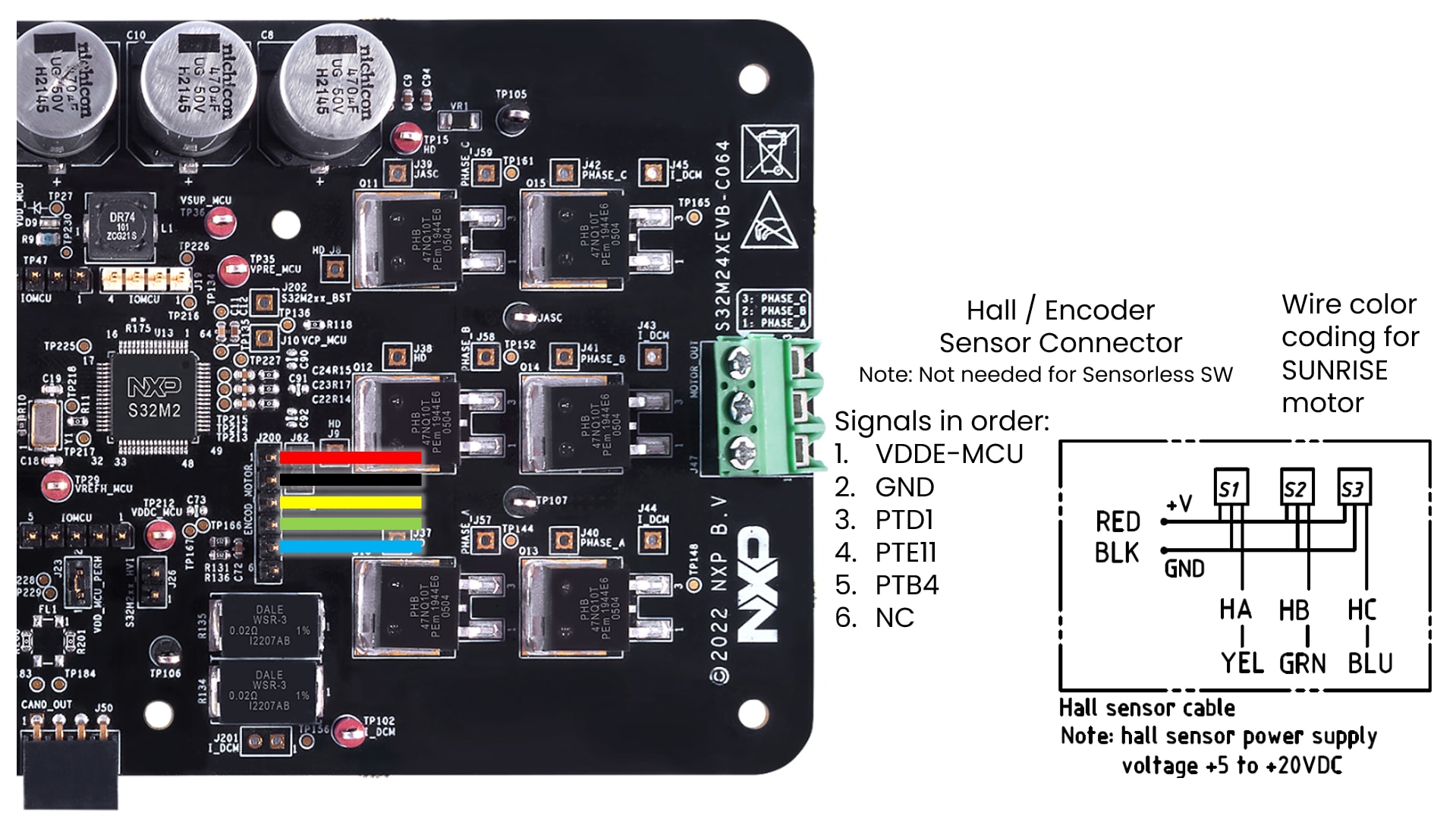
3.4 電源とUSBデバッグ・インターフェースの接続
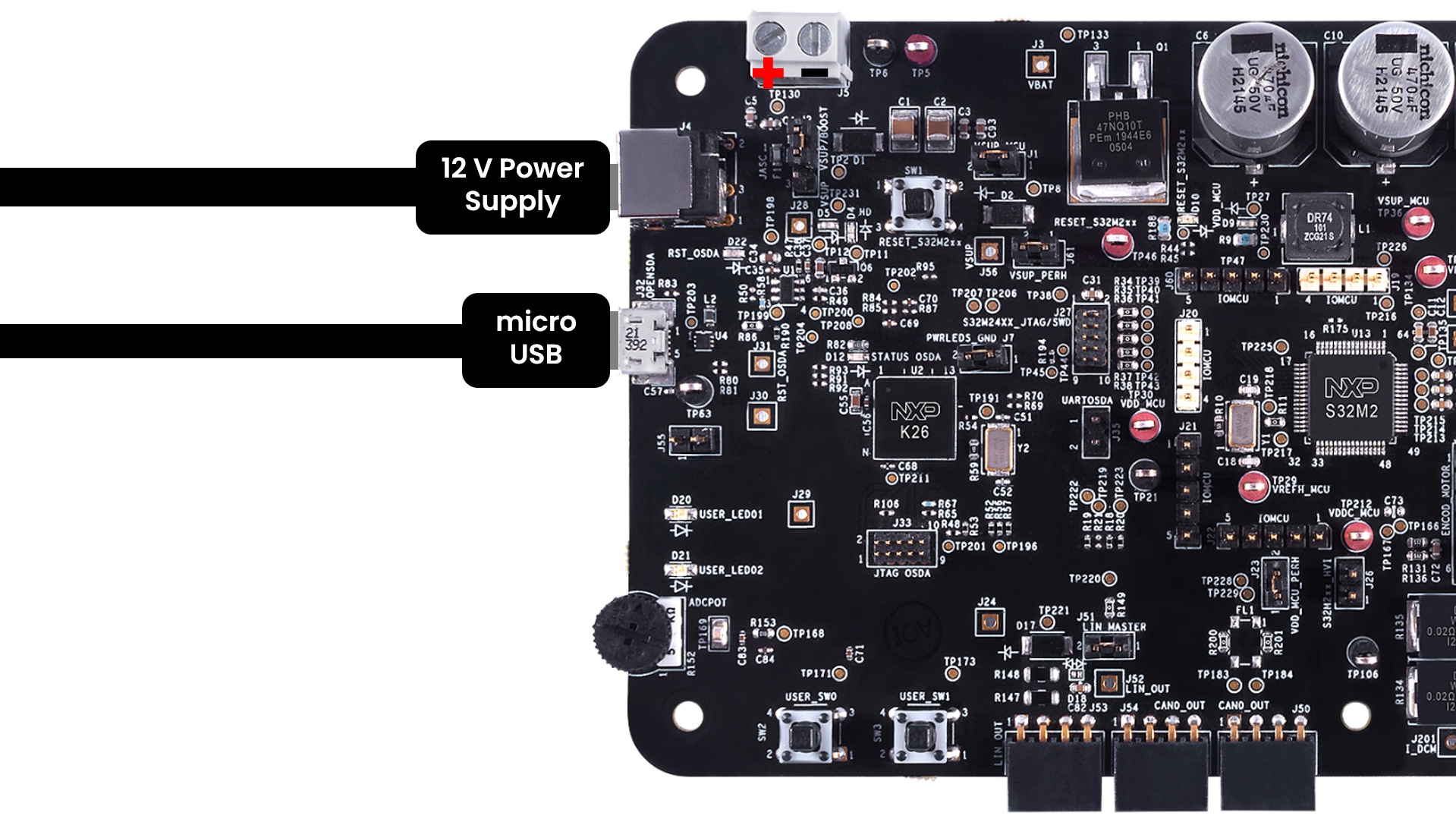
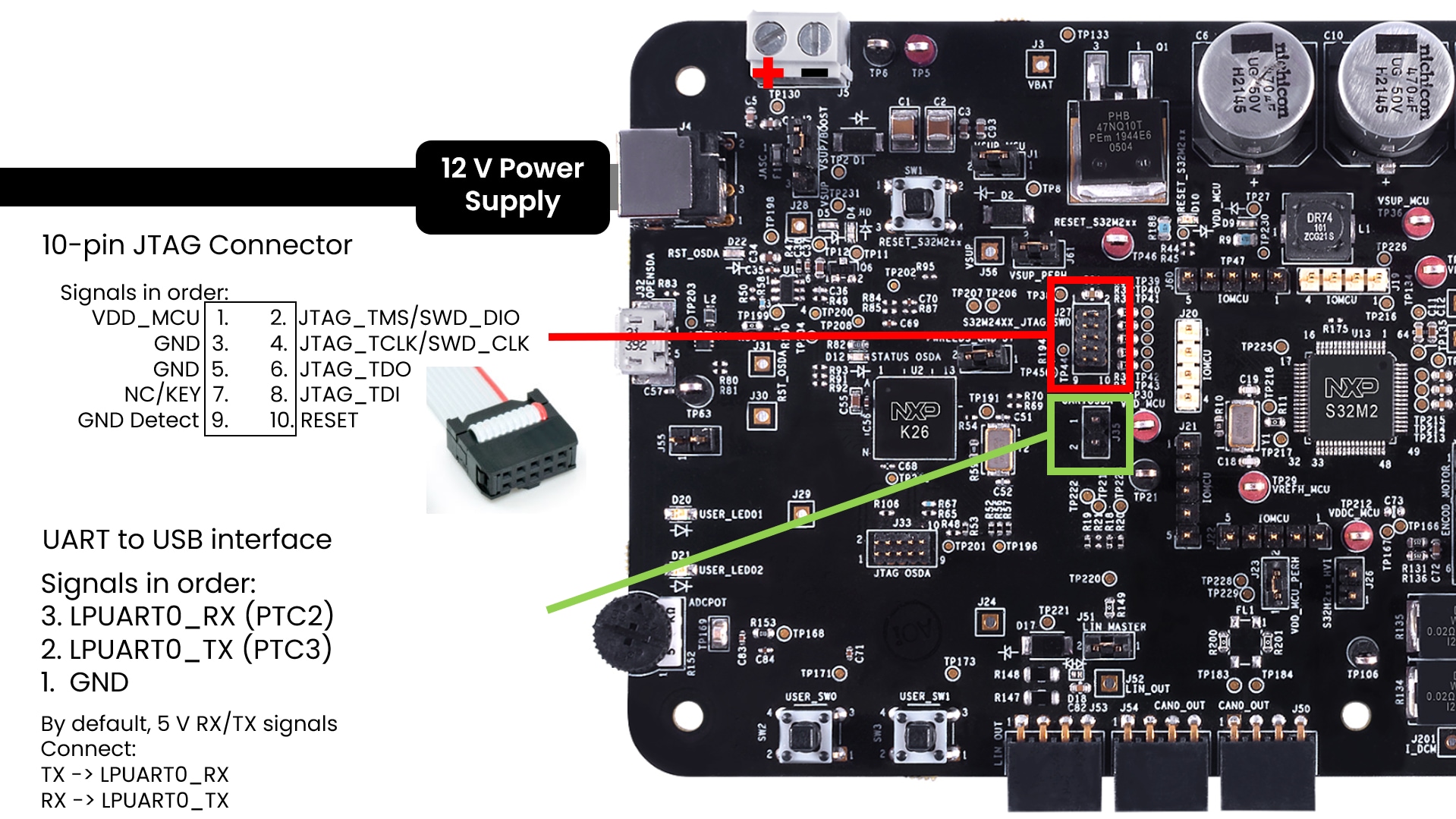
4. ビルドと実行
4.1 ビルドと実行
開発を加速するには、アプリケーション・コード・ハブをご覧ください。アプリケーション・コード・ハブでは、以下のことが可能です。
- 検証済みの広範なアプリケーション・サンプルへのアクセス
- 迅速なプロトタイピングのためのすぐに使えるソフトウェアのダウンロード
- 現行の設計ガイドラインやベスト・プラクティスに従ったテスト済みコード資産の活用
アプリケーション制御
モーターのパラメータ(必要な場合の手順)
BLDC_KIT(モーターSunrise 42BLY3A78-24110)を使用しない場合は、使用するBLDC/PMSMモーターに応じて、モーターのパラメータを編集する必要がある場合があります。モータ制御アプリケーション・チューニング (MCAT) ツールの[Parameters(パラメータ)]タブを開き、左側の値を編集します。
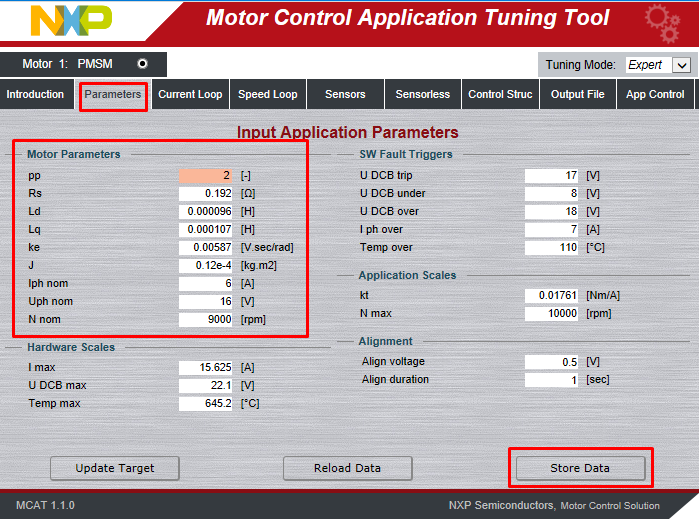
完了したら[Store Data(データを保存)]をクリックし、[Output File(出力ファイル)]タブに切り替えて、[Generate static configuration file(静的設定ファイルを生成)]をクリックします。
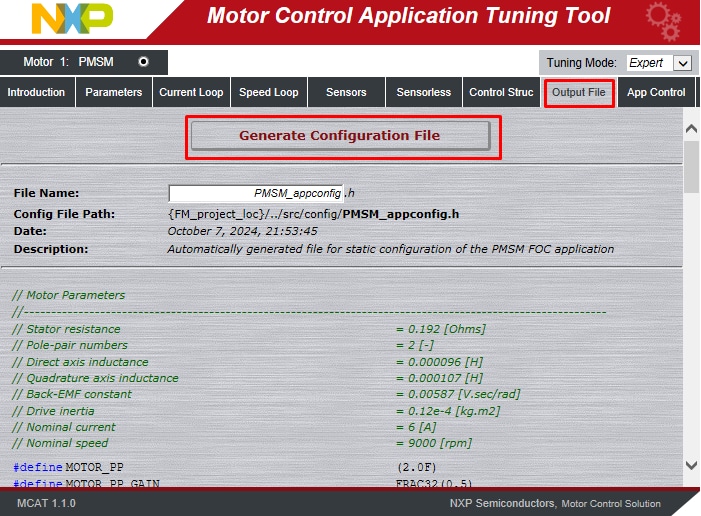
手順4.3を再度実行し、プロジェクトをビルドしてコードをMCUにアップロードします。
モーターを回転させる
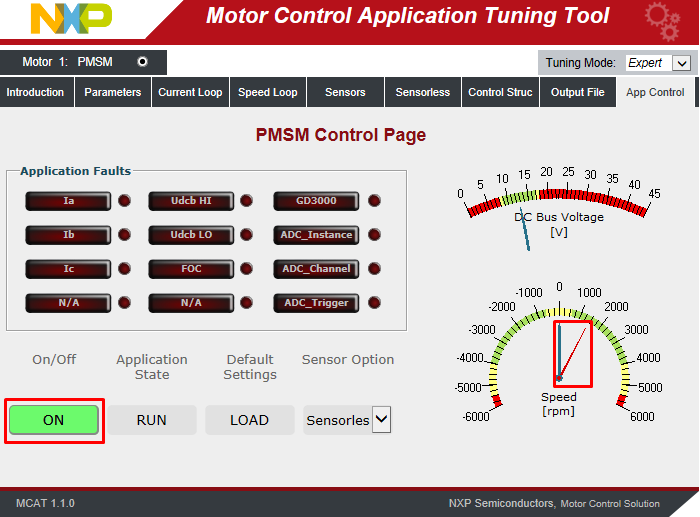
モータ制御アプリケーション・チューニング (MCAT) ツールのメニューで[App Control(アプリケーション制御)]タブをクリックして、アプリケーション制御ページを表示します。
モーターの回転数を設定し、モーター・ドライブをオンにします。
RTDサンプル
これらの便利なサンプルを使用してRTDの開発を始めましょう。開発を進めるのに役立つ資料として、最も一般的なユース・ケースのいくつかをまとめました。
ユーザーは、RTDをダウンロードしたら、ウィンドウに直接パスをコピーできます。
RTDサンプル
AE HANDLER FAULTS
C:\NXP\S32DS.3.6.1\S32DS\software\PlatformSDK_S32K3\RTD\Ae_TS_T40D34M30I0R0\examples\S32DS\S32M276\Ae_Handler_Faults_Example_DS_001_S32M276AE SPI
C:\NXP\S32DS.3.6.1\S32DS\software\PlatformSDK_S32K3\RTD\Ae_TS_T40D34M30I0R0\examples\S32DS\S32M276\Ae_Spi_Example_DS_001_S32M276AEC SPI
C:\NXP\S32DS.3.6.1\S32DS\software\PlatformSDK_S32K3\RTD\Ae_TS_T40D34M30I0R0\examples\S32DS\S32M276\Aec_Ip_Spi_Example_DS_001_S32M276CAN TRCV
C:\NXP\S32DS.3.6.1\S32DS\software\PlatformSDK_S32K3\RTD\CanTrcv_43_AE_TS_T40D34M30I0R0\examples\S32DS\S32M276\CanTrcv_Example_S32M276DPGA
C:\NXP\S32DS.3.6.1\S32DS\software\PlatformSDK_S32K3\RTD\Dpga_TS_T40D34M30I0R0\examples\S32DS\S32M276\Dpga_example_S32M276DPGA IP
C:\NXP\S32DS.3.6.1\S32DS\software\PlatformSDK_S32K3\RTD\Dpga_TS_T40D34M30I0R0\examples\S32DS\S32M276\Dpga_Ip_example_S32M276GDU
C:\NXP\S32DS.3.6.1\S32DS\software\PlatformSDK_S32K3\RTD\Gdu_TS_T40D34M30I0R0\examples\S32DS\S32M276\Gdu_Example_DS_S32M276LIN TRCV
C:\NXP\S32DS.3.6.1\S32DS\software\PlatformSDK_S32K3\RTD\Lin_43_LPUART_FLEXIO_TS_T40D34M30I0R0\examples\S32DS\S32M276\Lin_LinTrcv_Flexio_MasterFrameTransfer_S32M276LIN TRCV LPUART
C:\NXP\S32DS.3.6.1\S32DS\software\PlatformSDK_S32K3\RTD\Lin_43_LPUART_FLEXIO_TS_T40D34M30I0R0\examples\S32DS\S32M276\Lin_LinTrcv_Lpuart_MasterFrameTransfer_S32M276CLOCK IP
C:\NXP\S32DS.3.6.1\S32DS\software\PlatformSDK_S32K3\RTD\Mcu_TS_T40D34M30I0R0\examples\S32DS\S32M276\Clock_Ip_Example_S32M276MCU
C:\NXP\S32DS.3.6.1\S32DS\software\PlatformSDK_S32K3\RTD\Mcu_TS_T40D34M30I0R0\examples\S32DS\S32M276\Mcu_Example_S32M276POWER IP
C:\NXP\S32DS.3.6.1\S32DS\software\PlatformSDK_S32K3\RTD\Mcu_TS_T40D34M30I0R0\examples\S32DS\S32M276\Power_Ip_Example_S32M276MEM OTP IP
C:\NXP\S32DS.3.6.1\S32DS\software\PlatformSDK_S32K3\RTD\Ocotp_TS_T40D34M30I0R0\examples\S32DS\S32M276\Mem_Otp_Ip_Example_S32M276OCOTP
C:\NXP\S32DS.3.6.1\S32DS\software\PlatformSDK_S32K3\RTD\Ocotp_TS_T40D34M30I0R0\examples\S32DS\S32M276\Ocotp_Example_S32M276PLATFORM MPU HLD
C:\NXP\S32DS.3.6.1\S32DS\software\PlatformSDK_S32K3\RTD\Platform_TS_T40D34M30I0R0\examples\S32DS\S32M276\Platform_MPU_HLD_Example_S32M276MPU IP
C:\NXP\S32DS.3.6.1\S32DS\software\PlatformSDK_S32K3\RTD\Platform_TS_T40D34M30I0R0\examples\S32DS\S32M276\Platform_MPU_IP_Example_S32M276PORT
C:\NXP\S32DS.3.6.1\S32DS\software\PlatformSDK_S32K3\RTD\Port_TS_T40D34M30I0R0\examples\S32DS\S32M276\Port_Example_S32M276SIUL2 PORT IP
C:\NXP\S32DS.3.6.1\S32DS\software\PlatformSDK_S32K3\RTD\Port_TS_T40D34M30I0R0\examples\S32DS\S32M276\Siul2_Port_Ip_Example_S32M276WDOG
C:\NXP\S32DS.3.6.1\S32DS\software\PlatformSDK_S32K3\RTD\Wdg_TS_T40D34M30I0R0\examples\S32DS\S32M276\Wdg_Example_S32M276WDOG IP
C:\NXP\S32DS.3.6.1\S32DS\software\PlatformSDK_S32K3\RTD\Wdg_TS_T40D34M30I0R0\examples\S32DS\S32M276\Wdg_Ip_Example_S32M276設計・リソース
ボード情報
チップに関するドキュメント
ソフトウェア
サポート
フォーラム
NXPのコミュニティ・サイトで、他のエンジニアとつながり、FRDM-A-S32M276リファレンス・デザイン・ボードを使用した設計に関する専門的なアドバイスを受けることができます。